


Friday, 6 December 2013
How to disable back button in browser
Add onload="noBack();" onpageshow="if (event.persisted) noBack();" on body tag.
Example :
<html xmlns="http://www.w3.org/1999/xhtml" >
<head runat="server">
<title>Untitled Page</title>
</head>
<body onload="noBack();" onpageshow="if (event.persisted) noBack();">
<form id="form1" runat="server" >
<div>
login name : <asp:TextBox ID="TextBox1" runat="server"></asp:TextBox> <br />
password :<asp:TextBox ID="TextBox2" runat="server"></asp:TextBox> <br />
<asp:Button ID="Button1" runat="server" Text="ok" />
</div>
</form>
</body>
</html>
Example :
<html xmlns="http://www.w3.org/1999/xhtml" >
<head runat="server">
<title>Untitled Page</title>
</head>
<body onload="noBack();" onpageshow="if (event.persisted) noBack();">
<form id="form1" runat="server" >
<div>
login name : <asp:TextBox ID="TextBox1" runat="server"></asp:TextBox> <br />
password :<asp:TextBox ID="TextBox2" runat="server"></asp:TextBox> <br />
<asp:Button ID="Button1" runat="server" Text="ok" />
</div>
</form>
</body>
</html>
Monday, 2 December 2013
prevent page refresh on button click in asp.net c#
.aspx code
<html xmlns="http://www.w3.org/1999/xhtml" >
<head runat="server">
<title>Ajax Update panel</title>
</head>
<body>
<form id="form1" runat="server">
<div>
<asp:ScriptManager ID="ScriptManager1" runat="server"/>
<asp:UpdatePanel ID="UpdatePanel1" runat="server" UpdateMode="Conditional">
<ContentTemplate>
panel 1:<asp:Label ID="Label1" runat="server"></asp:Label>
</ContentTemplate>
</asp:UpdatePanel>
<asp:UpdatePanel ID="UpdatePanel2" runat="server" UpdateMode="Conditional">
<ContentTemplate>
panel 2:<asp:Label ID="Label2" runat="server" ></asp:Label>
<asp:Button ID="Button1" runat="server" Text="Button" onclick="Button1_Click" />
</ContentTemplate>
<Triggers>
<asp:AsyncPostBackTrigger ControlID="Button1"/>
</Triggers>
</asp:UpdatePanel>
</div>
</form>
</body>
</html>
.cs page
protected void Page_Load(object sender, EventArgs e)
{
Label1.Text = DateTime.Now.ToString();
Label2.Text = DateTime.Now.ToString();
}
protected void Button1_Click(object sender, EventArgs e)
{
Label1.Text = DateTime.Now.ToString();
Label2.Text = DateTime.Now.ToString();
}
<html xmlns="http://www.w3.org/1999/xhtml" >
<head runat="server">
<title>Ajax Update panel</title>
</head>
<body>
<form id="form1" runat="server">
<div>
<asp:ScriptManager ID="ScriptManager1" runat="server"/>
<asp:UpdatePanel ID="UpdatePanel1" runat="server" UpdateMode="Conditional">
<ContentTemplate>
panel 1:<asp:Label ID="Label1" runat="server"></asp:Label>
</ContentTemplate>
</asp:UpdatePanel>
<asp:UpdatePanel ID="UpdatePanel2" runat="server" UpdateMode="Conditional">
<ContentTemplate>
panel 2:<asp:Label ID="Label2" runat="server" ></asp:Label>
<asp:Button ID="Button1" runat="server" Text="Button" onclick="Button1_Click" />
</ContentTemplate>
<Triggers>
<asp:AsyncPostBackTrigger ControlID="Button1"/>
</Triggers>
</asp:UpdatePanel>
</div>
</form>
</body>
</html>
.cs page
protected void Page_Load(object sender, EventArgs e)
{
Label1.Text = DateTime.Now.ToString();
Label2.Text = DateTime.Now.ToString();
}
protected void Button1_Click(object sender, EventArgs e)
{
Label1.Text = DateTime.Now.ToString();
Label2.Text = DateTime.Now.ToString();
}
Saturday, 12 October 2013
Stylish Animated Tooltip in Asp.net

Hi friend's today i am explain about stylish tool tip for asp.net with animated effects .
It is very easy to embed to your webpages.You can also see change gridview row color based on data
and hide or visible div tag on button click .
ASp.net page.
<form id="form1" runat="server">
<div>
<div style="margin-top:150px">
dreamtheweb.com
<a href="#" class="tt">? <span class="tt-info"> (Tool tip Information )</span> </a>
</div>
</div>
</form>
.CSS
<style type="text/css">
.tt
{
background-color:#e2e2e2;
color:#878787;
border-radius:50%;
padding:2px 4px;
display:inline-block;
position:relative;
line-height:1;
font-size:9px;
font-size:0.9rem;
-webkit-transition:all 300ms ease;
transition:all 300ms ease
}
.tt-info{
font-size:1.2rem;
bottom:42px;
display:none;
position:absolute;
width:200px;
margin-left:-20px;
padding:10px;
color:#383838;
background:#fff;
border-collapse:separate;
box-shadow:0 0 5px 0 rgba(0,0,0,0.2);
border:1px solid #009FC4;
text-align:center;
line-height:1.2
}
.tt-info:before,.tt-info:after
{
content:"";
width:0;
height:0;
margin:0 0 0 -10px;
position:absolute;
left:20px;
bottom:-24px;
border-width:12px;
border-style:solid;
border-color:#009FC4 transparent transparent
}
.tt-info:after
{
bottom:-23px;
border-color:#fff transparent transparent;
}
@-moz-document url-prefix()
{.tt-info{opacity:0;
display:block;
pointer-events:none;
transition:all 300ms ease-out;
transform:scale(0.75) rotateX(90deg);
transform-origin:50% 100%
}
.tt:hover .tt-info,.tt.opened .tt-info
{
opacity:1;
transform:scale(1) rotateX(0)
}
</style>
Tips: You can easy to change width,color ,font size etc on .tt-info class style.
Tuesday, 8 October 2013
change gridview row color based on data
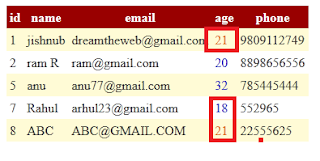
Check hide or visible div tag on button click and export grid into excel simple way using Asp.net
Hi friends today i discuss about change row color of grid view based on data.
here is the asp.net code.
Before do this you need to convert your required column into template field .
<html xmlns="http://www.w3.org/1999/xhtml" >
<head runat="server">
<title>Untitled Page</title>
</head>
<body>
<form id="form1" runat="server">
<div>
<asp:GridView ID="GridView1" runat="server" AutoGenerateColumns="False" ondatabound="GridView1_DataBound"
CellPadding="4" DataKeyNames="id" DataSourceID="SqlDataSource1"
ForeColor="#333333" GridLines="None">
<RowStyle BackColor="#FFFBD6" ForeColor="#333333" />
<Columns>
<asp:BoundField DataField="id" HeaderText="id" InsertVisible="False"
ReadOnly="True" SortExpression="id" />
<asp:BoundField DataField="name" HeaderText="name" SortExpression="name" />
<asp:BoundField DataField="email" HeaderText="email" SortExpression="email" />
<asp:TemplateField HeaderText="age" SortExpression="age">
<EditItemTemplate>
<asp:TextBox ID="TextBox1" runat="server" Text='<%# Bind("age") %>'></asp:TextBox>
</EditItemTemplate>
<ItemTemplate>
<asp:Label ID="Label1" runat="server" Text='<%# Bind("age") %>'></asp:Label>
</ItemTemplate>
</asp:TemplateField>
<asp:BoundField DataField="phone" HeaderText="phone" SortExpression="phone" />
</Columns>
<FooterStyle BackColor="#990000" Font-Bold="True" ForeColor="White" />
<PagerStyle BackColor="#FFCC66" ForeColor="#333333" HorizontalAlign="Center" />
<SelectedRowStyle BackColor="#FFCC66" Font-Bold="True" ForeColor="Navy" />
<HeaderStyle BackColor="#990000" Font-Bold="True" ForeColor="White" />
<AlternatingRowStyle BackColor="White" />
</asp:GridView>
</div>
<asp:SqlDataSource ID="SqlDataSource1" runat="server"
ConnectionString="<%$ ConnectionStrings:dreamthewebConnectionString %>"
SelectCommand="SELECT [id], [name], [email], [age], [phone] FROM [account]"></asp:SqlDataSource>
</form>
</body>
</html>
The code behind section [.cs page]
add this first
using System.Drawing;
protected void Page_Load(object sender, EventArgs e)
{
}
protected void GridView1_DataBound(object sender, EventArgs e)
{
for (int i = 0; i <= GridView1.Rows.Count - 1; i++)
{
Label last = (Label)GridView1.Rows[i].FindControl("Label1");
if (last.Text == "21")
{
last.ForeColor = ColorTranslator.FromHtml("#E16C0F");
}
else
{
last.ForeColor = ColorTranslator.FromHtml("#E16C0");
}
}
}
Download files

Monday, 7 October 2013
Jquery:function()
A function is a piece or block of code that separate from main code and execute wherever needed .
The Most Java script function syntax shown below.
function FUNCTION NAME ( )
{
// Your Codes
}
-a function start with keyword function followed by FUNCTION NAME .
-There are mainly two way to give name to function.
1. First is function deceleration . which create a function with out use of variable assignment .
eg:
function function1( )
{
$("div1").hide();
}
2. The second one is function expression .which use of variable assignment .
eg :
var function1= function( )
{
$("div1").hide();
}
anonymous function :
The other type of function called "anonymous function" .
anonymous function is also called self executing function .that doesnot have a name and it execute immediately when they are found in code.
The other important thing is the variable declare inside these types of function available only at the time of its execution .
eg:
function( )
{
}
Thank you for reading this article. My next article related to java script function ie passing values inside function and return values too . So read our next part and subscribe our free news letter via mail.
The Most Java script function syntax shown below.
function FUNCTION NAME ( )
{
// Your Codes
}
-a function start with keyword function followed by FUNCTION NAME .
-There are mainly two way to give name to function.
1. First is function deceleration . which create a function with out use of variable assignment .
eg:
function function1( )
{
$("div1").hide();
}
2. The second one is function expression .which use of variable assignment .
eg :
var function1= function( )
{
$("div1").hide();
}
anonymous function :
The other type of function called "anonymous function" .
anonymous function is also called self executing function .that doesnot have a name and it execute immediately when they are found in code.
The other important thing is the variable declare inside these types of function available only at the time of its execution .
eg:
function( )
{
}
Thank you for reading this article. My next article related to java script function ie passing values inside function and return values too . So read our next part and subscribe our free news letter via mail.
Sunday, 11 August 2013
Hide or Visible Div tag on button click
Full code:
<html>
<head>
<title>jQuery Hide and show div content</title>
<script src="http://code.jquery.com/jquery-1.10.1.min.js"></script>
<script src="http://code.jquery.com/jquery-migrate-1.2.1.min.js"></script>
</head>
<body>
<p><h1>Dreamthewebs.blogspot.com</h1></p>
<div id="slide" style="width:250px; height:50px; background-color:Olive; color:White; font-size:large">
Click Click show and hide button<br />
dreamthewbs.blogspot.com
</div>
<br />
<button id="hide"> Hide</button>
<button id="show">Show </button>
<script>
$(document).ready(function()
{
$("#hide").click(function()
{
//code for show
$("#slide").hide();
});
//code for show
$("#show").click(function()
{
$("#slide").show();
});
});
</script>
</body>
</html>
Demo
<html>
<head>
<title>jQuery Hide and show div content</title>
<script src="http://code.jquery.com/jquery-1.10.1.min.js"></script>
<script src="http://code.jquery.com/jquery-migrate-1.2.1.min.js"></script>
</head>
<body>
<p><h1>Dreamthewebs.blogspot.com</h1></p>
<div id="slide" style="width:250px; height:50px; background-color:Olive; color:White; font-size:large">
Click Click show and hide button<br />
dreamthewbs.blogspot.com
</div>
<br />
<button id="hide"> Hide</button>
<button id="show">Show </button>
<script>
$(document).ready(function()
{
$("#hide").click(function()
{
//code for show
$("#slide").hide();
});
//code for show
$("#show").click(function()
{
$("#slide").show();
});
});
</script>
</body>
</html>
Demo
Change text color on button click
Today i show Change text color on button click event using jQuery . You can implement this on asp,html etc
Full Code:
<html>
<head>
<title>jQuery color change</title>
<script src="http://code.jquery.com/jquery-1.10.1.min.js"></script>
<script src="http://code.jquery.com/jquery-migrate-1.2.1.min.js"></script>
</head>
<body>
<p><h1>Dreamthewebs.blogspot.com</h1></p>
<button id="color" > Change color</button>
<script>
$(document).ready(function()
{
//change color
$("h1").css({"color":"red" });
$("#color").click( function()
{
$("h1").css({"color":"blue" });
});
});
</script>
</body>
</html>
Demo
Full Code:
<html>
<head>
<title>jQuery color change</title>
<script src="http://code.jquery.com/jquery-1.10.1.min.js"></script>
<script src="http://code.jquery.com/jquery-migrate-1.2.1.min.js"></script>
</head>
<body>
<p><h1>Dreamthewebs.blogspot.com</h1></p>
<button id="color" > Change color</button>
<script>
$(document).ready(function()
{
//change color
$("h1").css({"color":"red" });
$("#color").click( function()
{
$("h1").css({"color":"blue" });
});
});
</script>
</body>
</html>
Demo